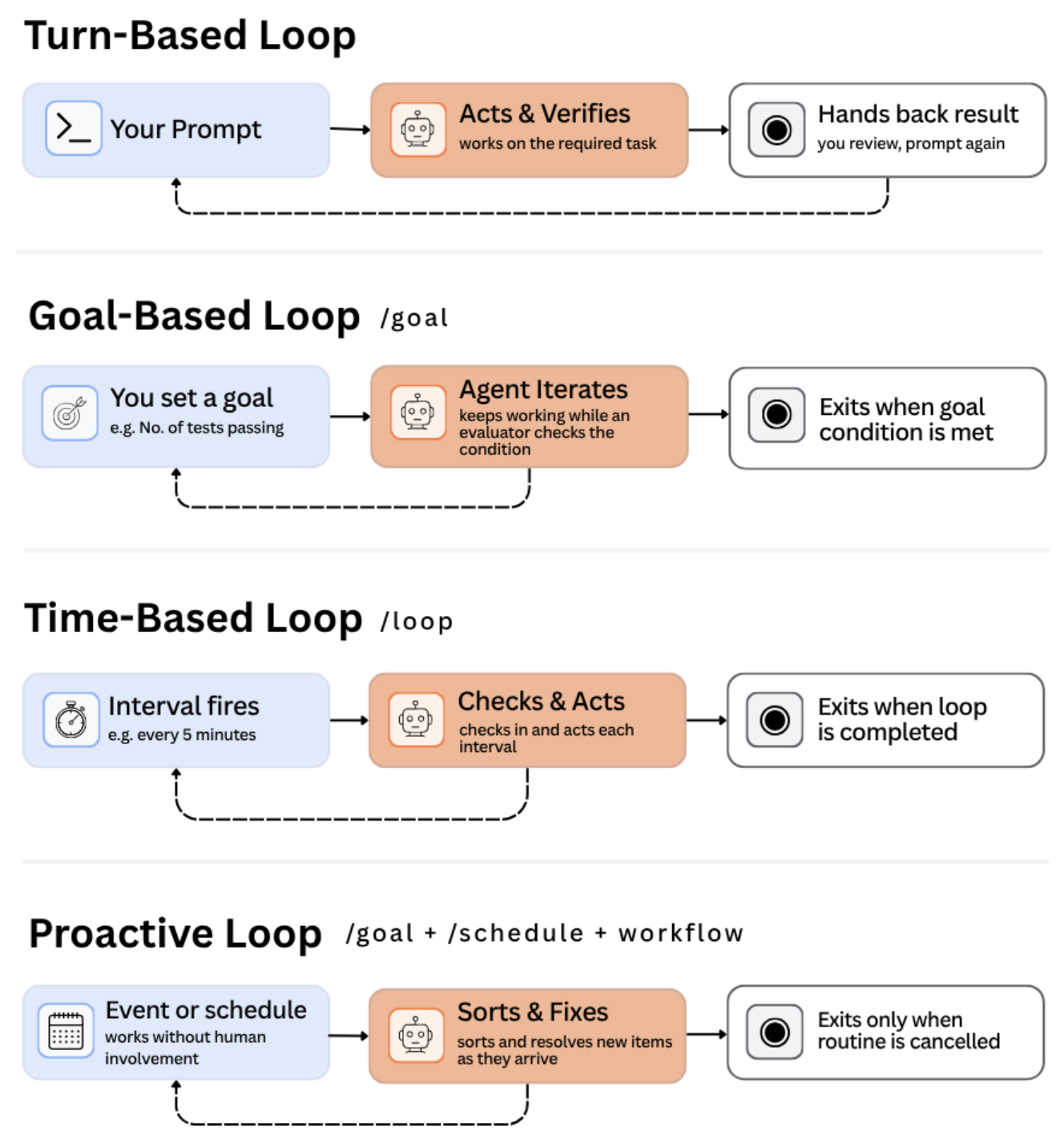
If you have ever prompted Claude Code, waited for it to make a change, and then re-prompted it, you have already run an AI agent loop without knowing it. A loop is simply a cycle an agent repeats until a stop condition is met: something triggers it, the agent acts, it checks the result, and it repeats. A single prompt-and-response is not a loop, it is just one pass through the cycle. The only real question when choosing a loop is this: do you have a concrete finish line, or is the work ongoing? There are four types, and the main thing that separates them is who decides when to stop.
Turn-based: the loop you already use
You type a prompt, Claude acts, and it stops when Claude decides the task is done or needs more input from you. It fits short, self-contained tasks. Example: "Refactor this data-cleaning function so it handles null values without breaking anything downstream." You review the result and re-prompt if needed. The lever you actually control here is how well Claude can check its own work, so tell it how you would verify the change by hand.
Goal-based: hand off the finish line
Using the goal command, you hand off the finish line, not just the task. You define a measurable target once, and the loop keeps going until it hits that target or a turn limit you set. The difference from turn-based is not the trigger, it is who decides when to stop. The catch is that the goal must be measurable. Say "Get this model's validation accuracy above 85%," not the vague "Make this model better." Easy way to remember it: goal-based only works when you can finish the sentence "this is done when ___" with a number.
Time-based: let a clock decide when to check in
Using the loop or schedule commands, a clock or a changing system decides when to check in. It fits recurring work, or anything tied to a system that changes on its own timeline. Example: every 30 minutes, check whether a training job has finished and summarize the results. Important gotcha, the loop command only runs while your machine is on, so if you close your laptop it stops. Use the schedule command when you need it to keep running without you.
Proactive: nobody presses go
An event or a schedule triggers it, with no one prompting in the moment, and the routine keeps running until someone turns it off. This is really the other three stacked together: something watches for new work, defines what "done" looks like, and works each item to its goal. Example: every hour, check a queue of flagged model outputs, and for each one work toward a defined goal. It is the most autonomous type, so start it on a single low-risk, recurring task before wiring it to anything with real consequences.
The four, side by side
Turn-based: you trigger it each time, Claude's own judgment decides it is done, best for short one-off work. Goal-based: you trigger it once, a measurable threshold decides, best for work with a clear finish line. Time-based: a timer or interval triggers it, you cancel it or it finishes, best for recurring or external-system work. Proactive: an event or schedule triggers it, each item's own goal decides, best for steady streams of defined work.
Goal-based vs time-based: the one that trips people up
Both extend a task past a single exchange, so they get mixed up. Reach for goal-based when you can finish "this is done when ___" with something you could actually measure. Reach for time-based when there is no finish line, just an ongoing need to check back in. A simple test: would the task make sense to run once and be finished? If yes, use goal-based; if it only makes sense on repeat, use time-based.
What breaks loops in practice
None of the four hold up without a decent system around them. A messy codebase produces messy loop output, because Claude follows whatever conventions already exist. Claude can only verify what you tell it to check, so spelling out what "correct" looks like reduces how often you step in. Stale docs create confidently wrong output. And an agent reviewing its own work shares the same blind spots that produced the work, so a second agent catches what the first one will not. Token cost is the other thing worth watching, since it stays invisible until it is not.